
ServiceNow is a cloud-based digital workflow platform that helps businesses manage IT services, employee workflows, customer operations, security, and enterprise processes from one centralized system.
Instead of relying on multiple disconnected tools, organizations can use ServiceNow to automate workflows, manage requests, track incidents, store business data, and connect different departments.
In this guide, you’ll learn how ServiceNow works, its architecture, key modules, workflows, automation, benefits, limitations, and why businesses continue to use it in 2026.
What is ServiceNow?
ServiceNow is an enterprise cloud platform designed to automate and manage digital workflows.
It helps organizations connect people, processes, systems, and data in one platform.
ServiceNow is widely used for:
- IT Service Management (ITSM)
- IT Operations Management (ITOM)
- IT Business Management (ITBM)
- Customer Service Management (CSM)
- Human Resources Service Delivery (HRSD)
- Security Operations
- Governance, Risk, and Compliance (GRC)
- Application Development
The main idea is simple:
Automate repetitive work, standardize business processes, and provide employees with a single system for managing requests and operations.
How Does ServiceNow Work?
ServiceNow works by combining a cloud database, business rules, workflows, applications, integrations, and user interfaces.
A simplified ServiceNow request flow looks like this:
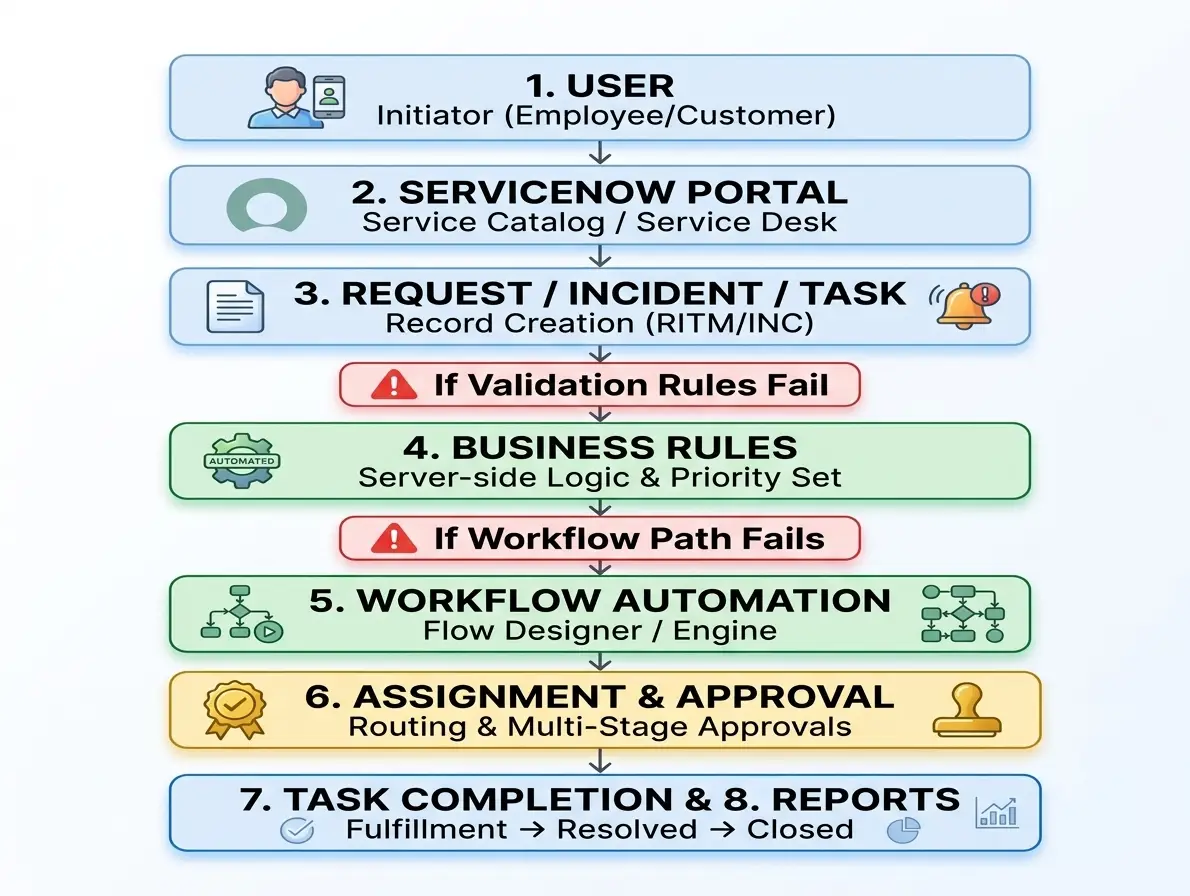
For example, when an employee reports a laptop problem:
- The employee creates an incident.
- ServiceNow stores the incident in the platform database.
- Business rules classify and prioritize the issue.
- The incident is automatically assigned to the correct team.
- Technicians work on the issue.
- The incident is updated and eventually closed.
- The data becomes available for reporting and analysis.
ServiceNow Architecture
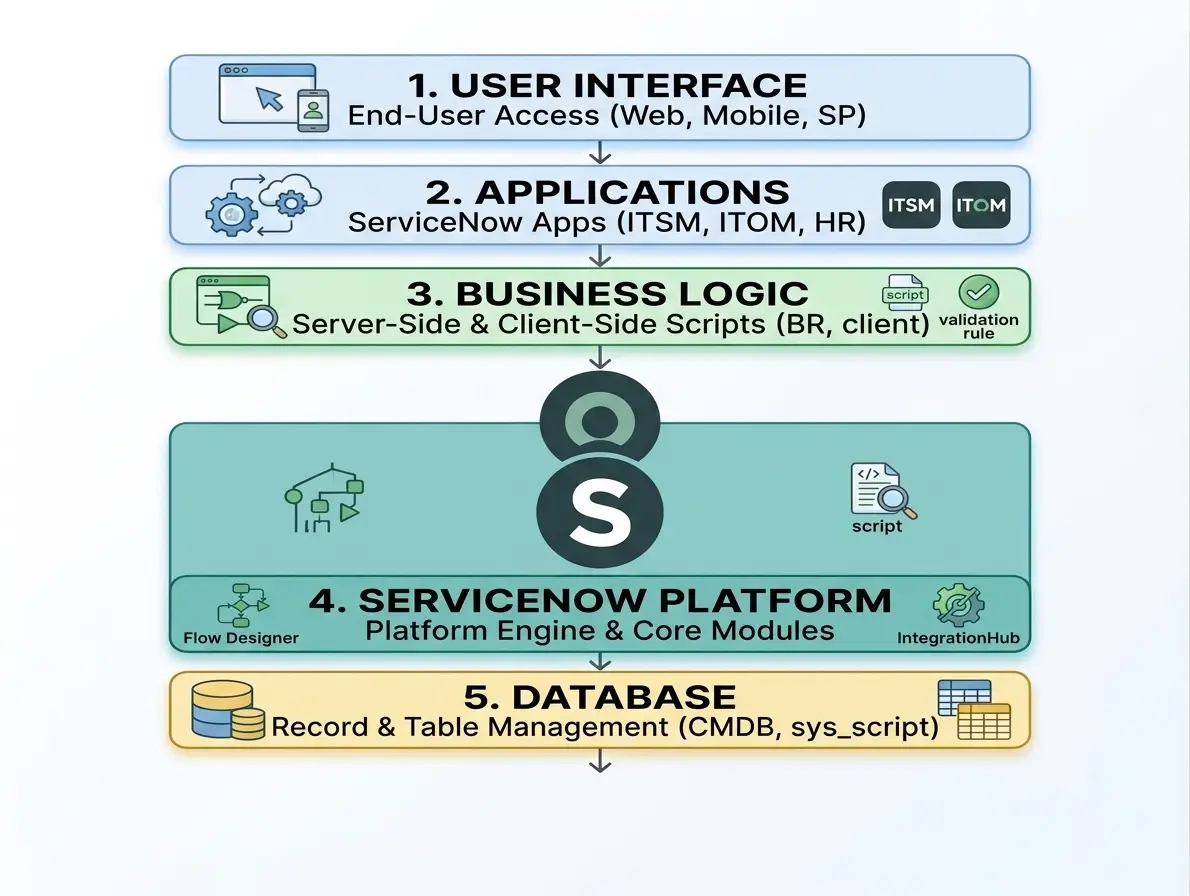
ServiceNow uses a multi-instance cloud architecture.
Each customer typically operates within an isolated ServiceNow instance containing its own:
- Data
- Applications
- Configurations
- Users
- Workflows
- Security rules
The platform is highly configurable, allowing organizations to customize workflows and applications without changing the core platform code.
A simplified architecture looks like this:
What is the ServiceNow Database?
ServiceNow stores information in tables.
Everything in the platform is generally represented as a record.
Examples include:
- Incidents
- Users
- Problems
- Changes
- Requests
- Configuration Items
- Knowledge Articles
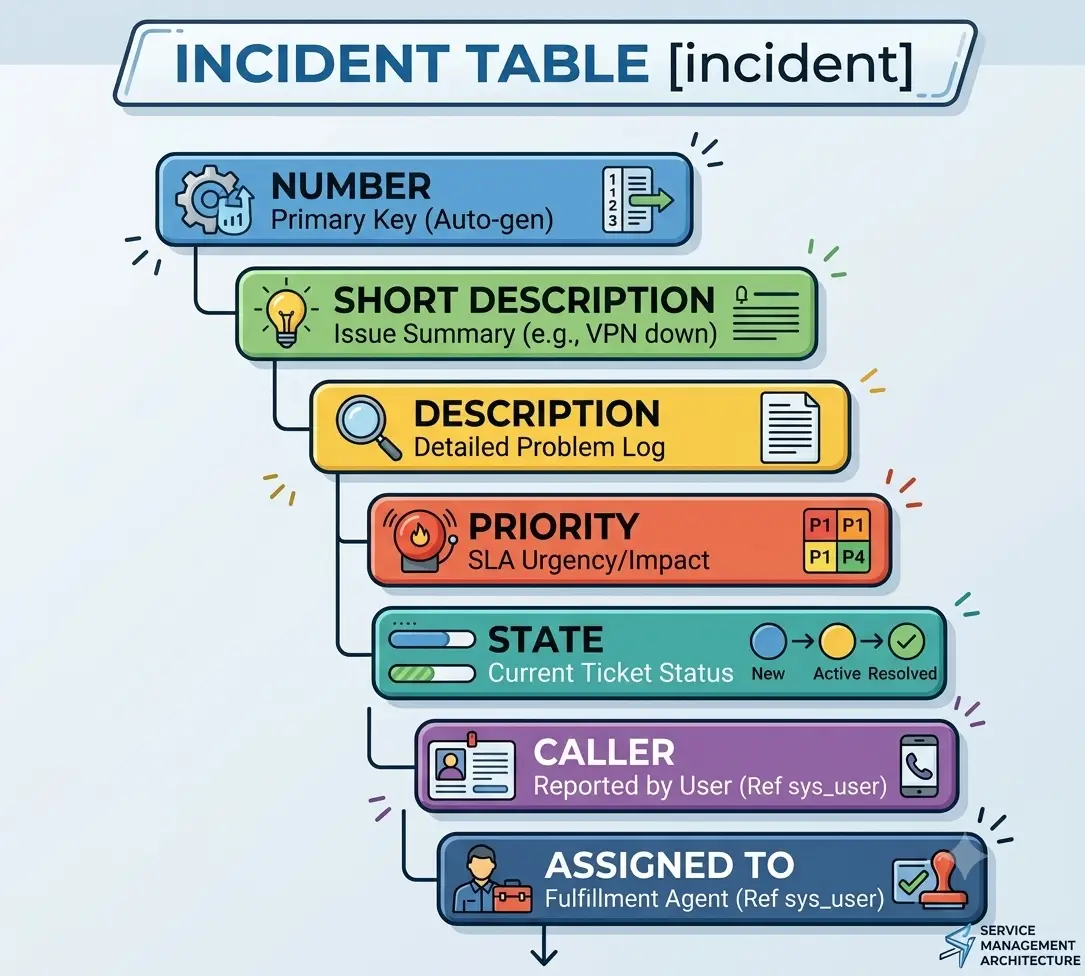
For example, an incident may contain:
Number
Short Description
Description
Priority
State
Assigned To
Assignment Group
Created Date
Updated Date
ServiceNow tables can be extended and customized according to business requirements.
What is a ServiceNow Table?
A table stores records in ServiceNow.
For example:
ServiceNow also supports table inheritance.
For example, the Task table can act as a parent table for several types of records.
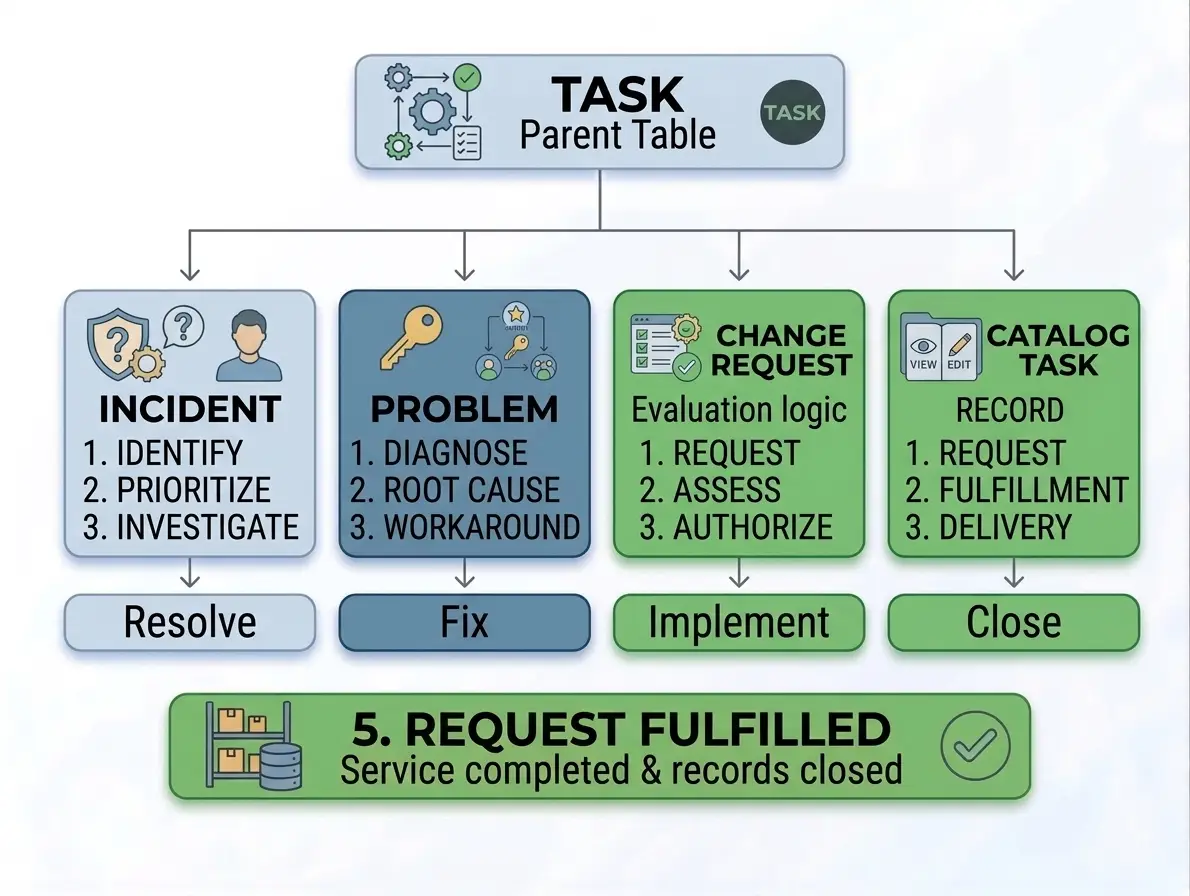
This structure allows ServiceNow to reuse common fields and functionality.
How ServiceNow Workflows Work
Workflows define how tasks move from one stage to another.
For example, an employee requesting software access may follow this process:
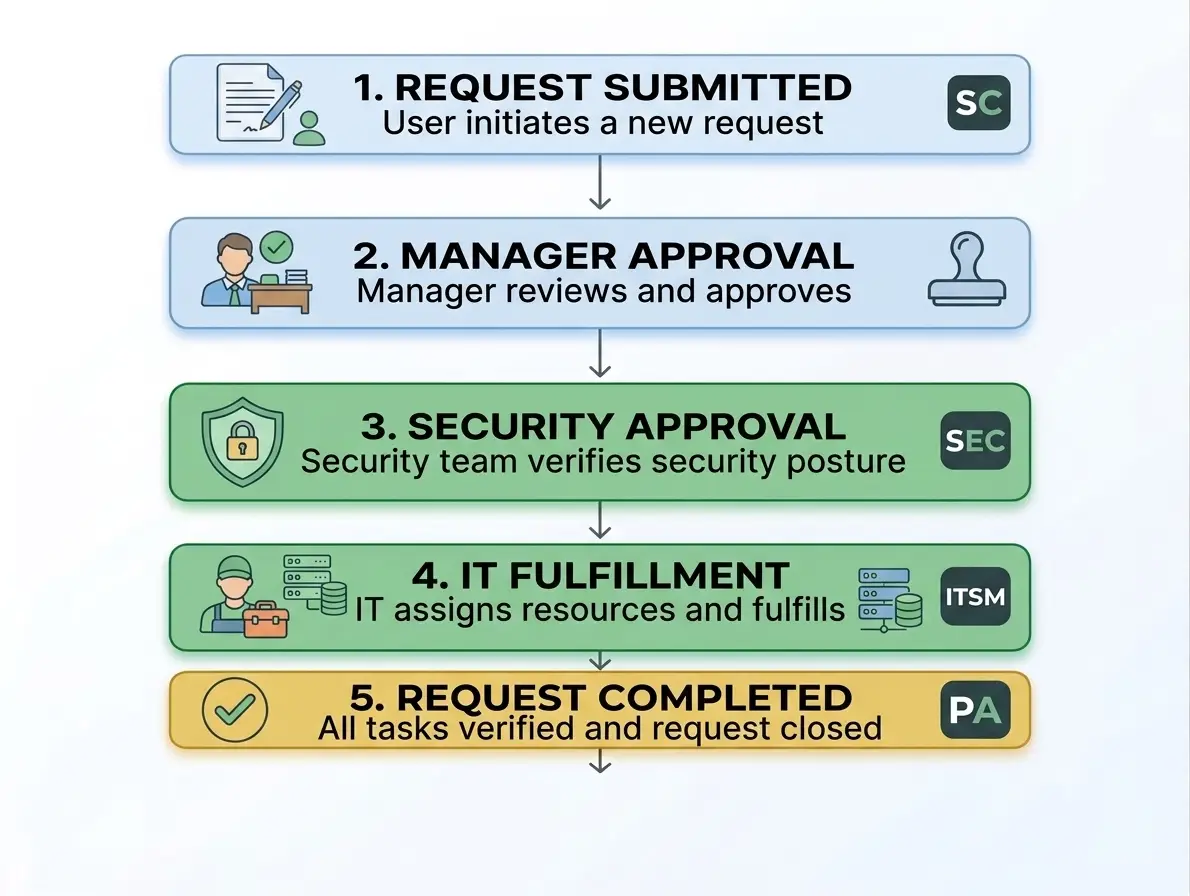
ServiceNow workflows can include:
- Approvals
- Notifications
- Task creation
- Assignment rules
- Conditions
- Automation
- Integrations
This allows organizations to automate complex business processes.
What is ServiceNow ITSM?
IT Service Management is one of the most widely used areas of ServiceNow.
ITSM helps organizations manage IT services and support operations.
Important ITSM processes include:
Incident Management
Incident Management helps restore normal service as quickly as possible after an interruption.
Examples:
- Email is not working.
- A laptop cannot connect to the network.
- An application is unavailable.
Problem Management
Problem Management focuses on identifying and resolving the root cause of recurring incidents.
Change Management
Change Management helps organizations plan, approve, implement, and track changes safely.
Request Management
Request Management handles standard employee requests such as:
- Software access
- Hardware requests
- Password resets
- New account requests
How ServiceNow Automation Works
Automation is one of the biggest advantages of ServiceNow.
A simple automation process may look like this:
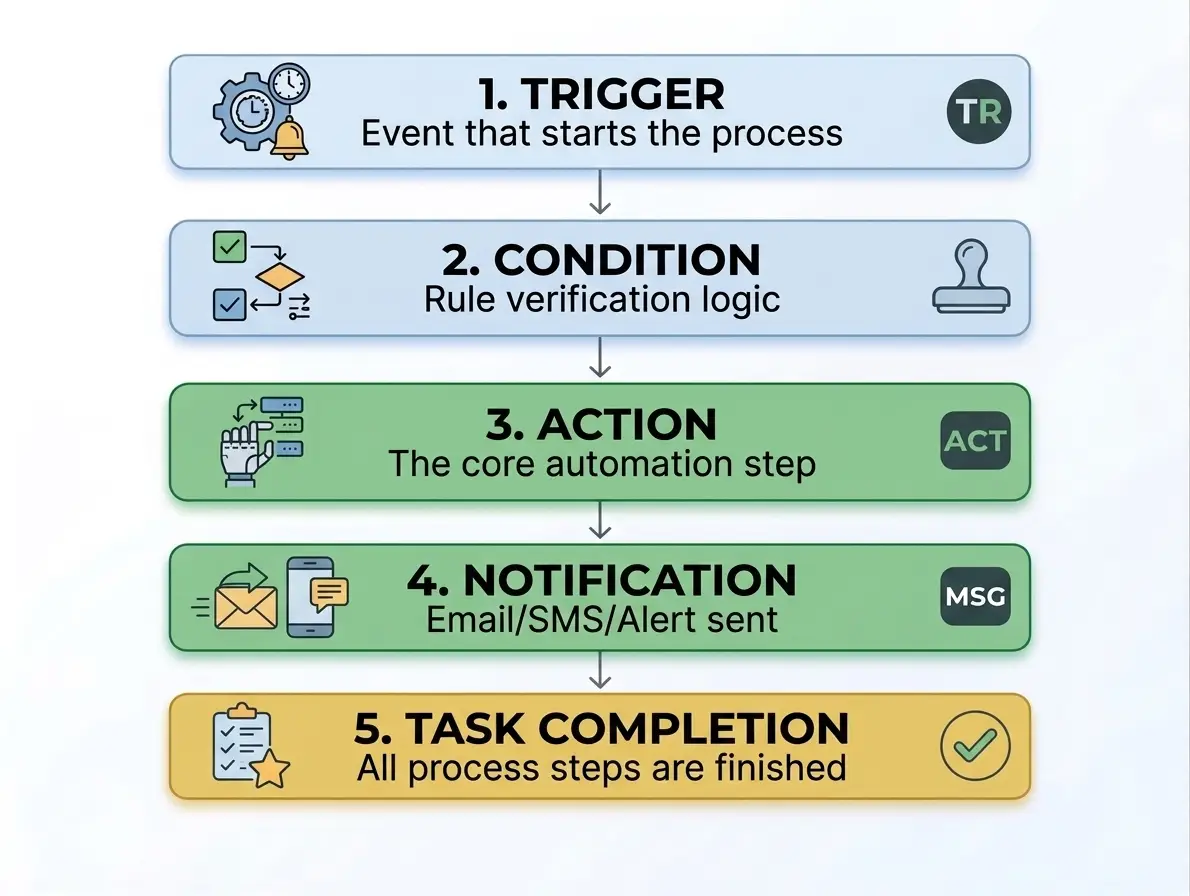
For example:
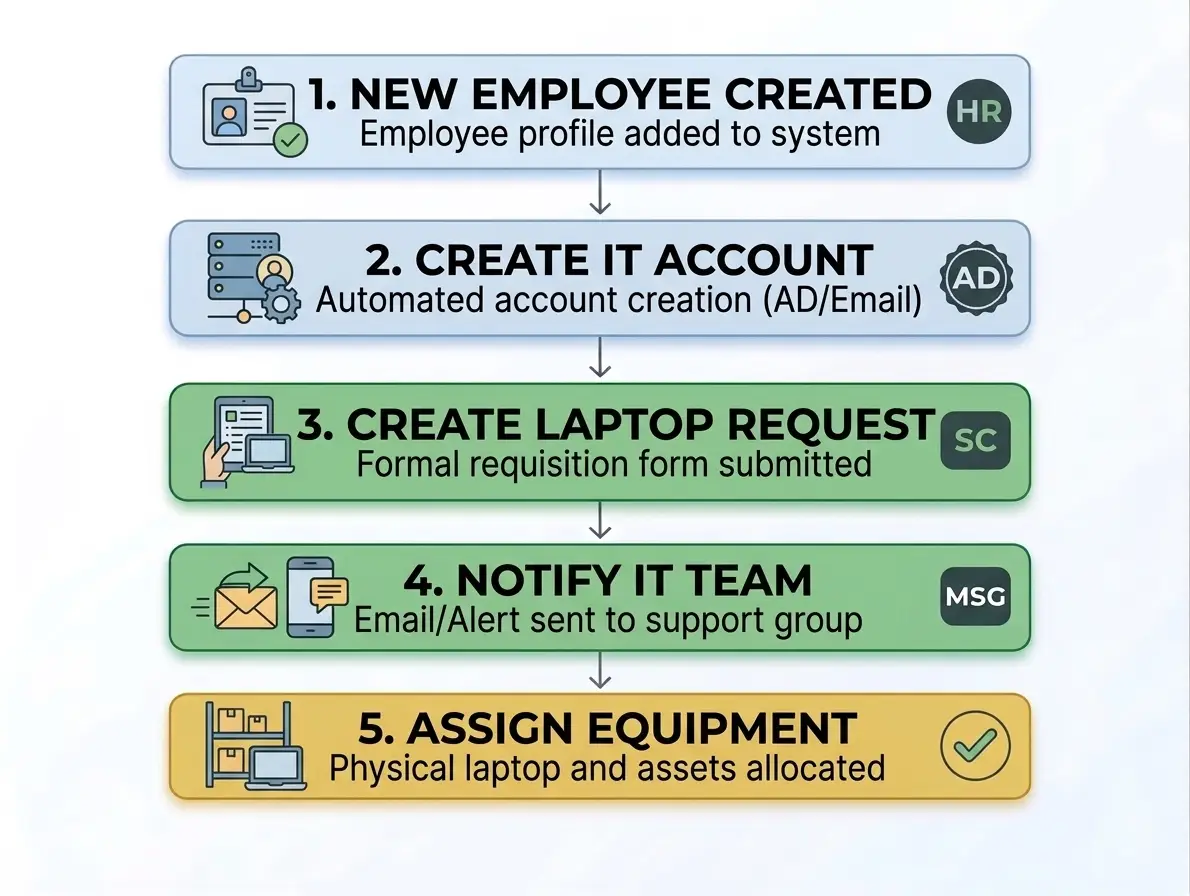
This reduces manual work and improves operational efficiency.
What are Business Rules in ServiceNow?
Business Rules are server-side scripts that run when records are inserted, updated, deleted, or queried.
They can be used to:
- Validate data
- Set field values
- Update related records
- Trigger automation
- Enforce business logic
Example:
if (current.priority == 1) {
    current.assignment_group = "IT Support";
}
Business Rules should be used carefully because poorly written server-side logic can affect platform performance.
What are Client Scripts?
Client Scripts run in the user’s browser.
They are commonly used to control form behavior.
Client Scripts can:
- Make fields mandatory
- Hide fields
- Show fields
- Set field values
- Validate user input
Example:
function onLoad() {
    g_form.setMandatory('description', true);
}
Client Scripts improve the user experience by making forms more dynamic.
How ServiceNow Integrations Work
ServiceNow can connect with external systems using APIs and integration tools.
Common integration methods include:
- REST APIs
- SOAP APIs
- IntegrationHub
- Web Services
- Import Sets
- Transform Maps
A typical integration looks like this:

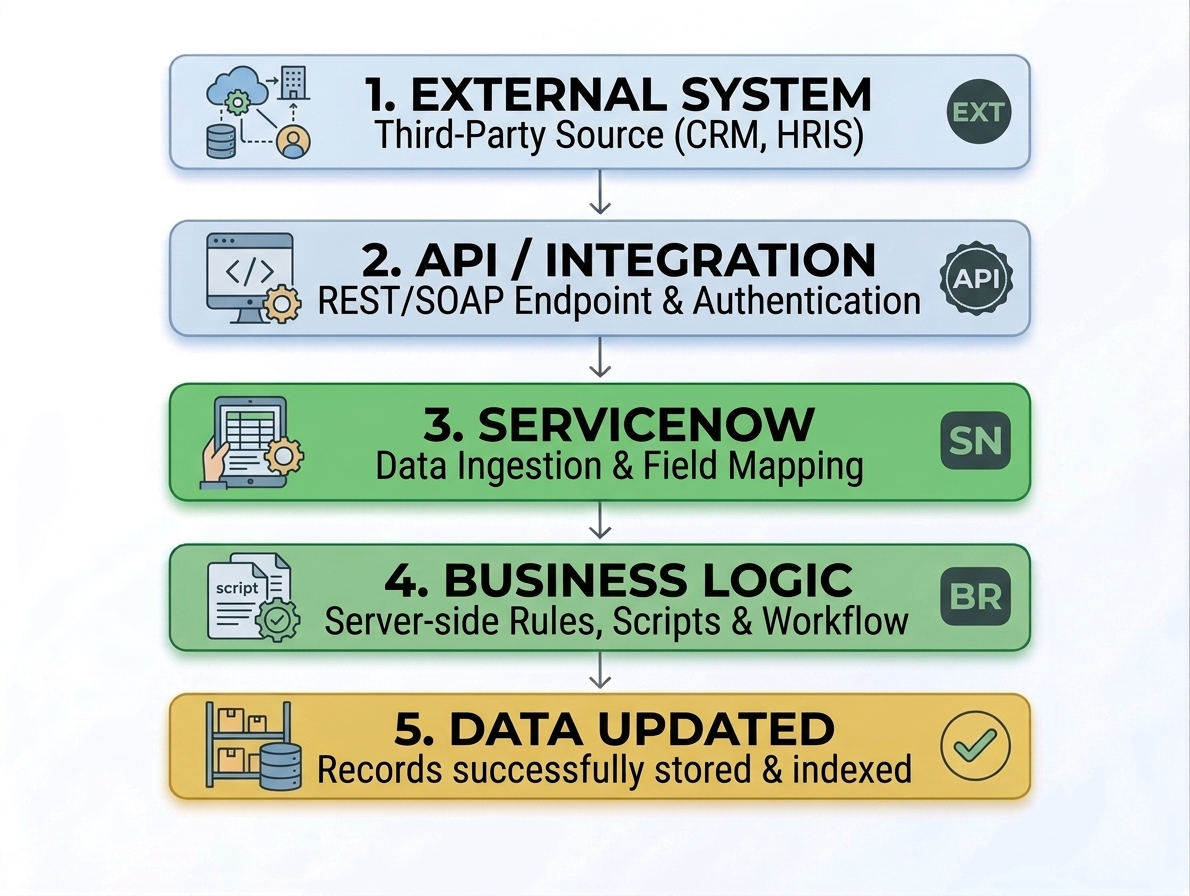
For example, ServiceNow can receive monitoring alerts from an external monitoring system and automatically create incidents.
What is ServiceNow IntegrationHub?
IntegrationHub helps ServiceNow connect with external applications and services.
It can be used to automate actions across systems.
For example:
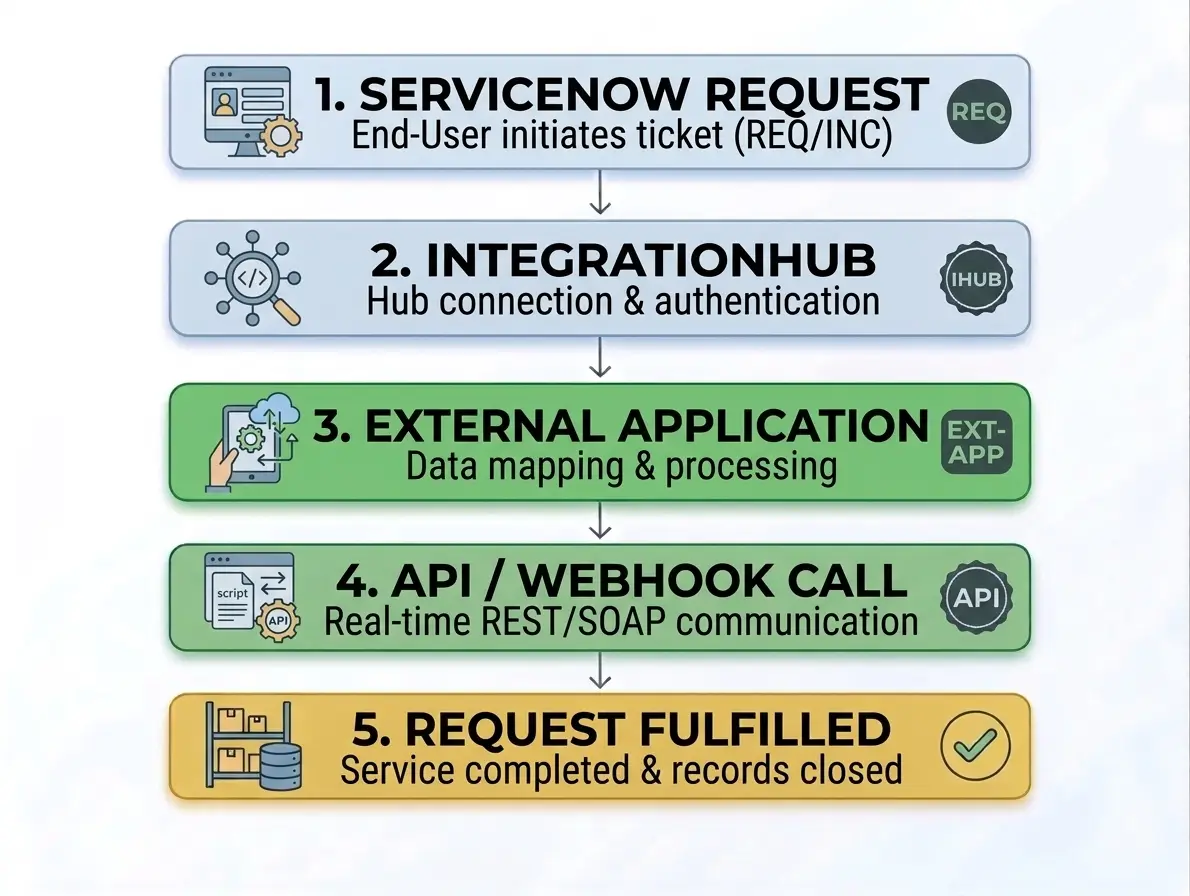
This can reduce manual data entry between different business systems.
How ServiceNow Security Works
ServiceNow provides multiple layers of security.
Important security features include:
- Roles
- Groups
- Access Control Rules
- Authentication
- Encryption
- Data Protection
Access Control Rules determine who can access or modify specific data.
For example:
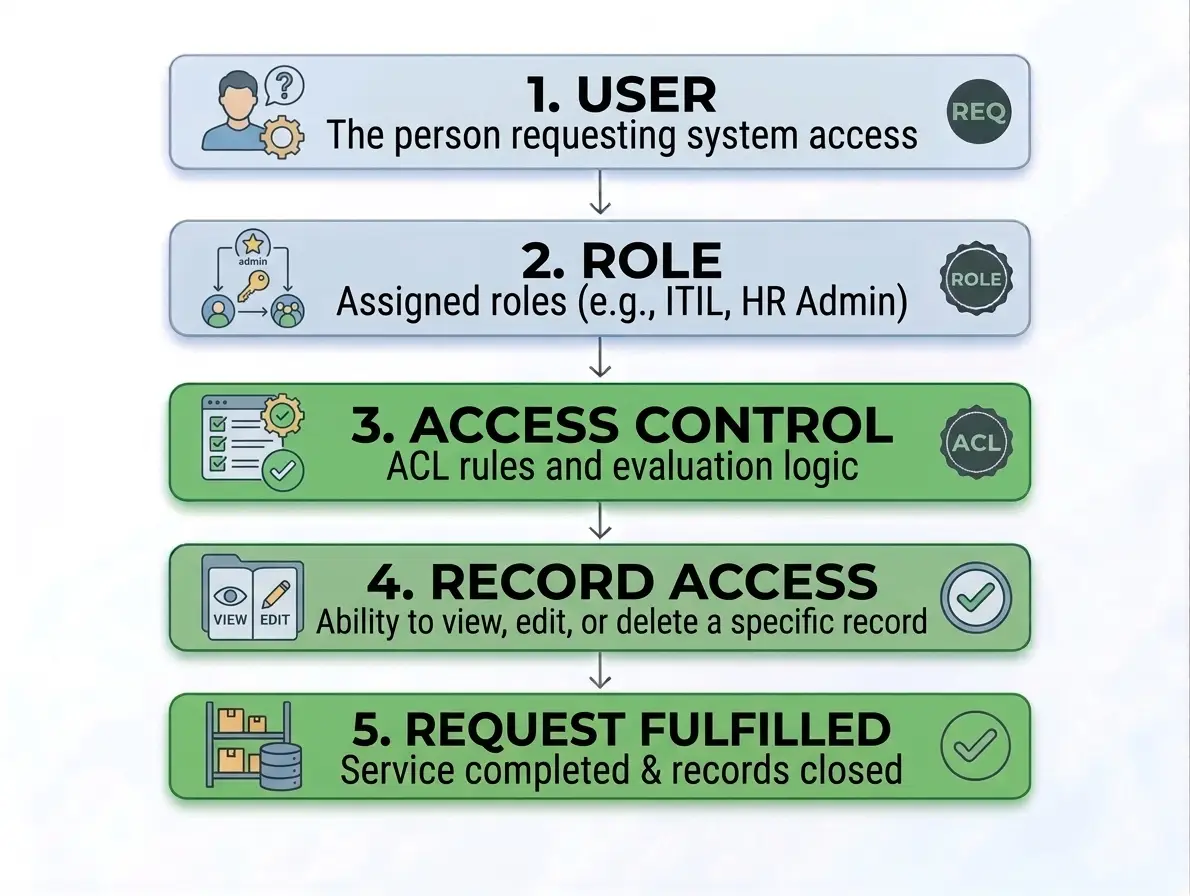
Security configuration should always follow the principle of least privilege.
What are ServiceNow Roles?
Roles define what users can do inside the platform.
For example:
- Admin users can manage platform configuration.
- IT agents can work on incidents and requests.
- Managers can approve requests.
- End users can submit and track requests.
Users can receive roles directly or through groups.
ServiceNow Reports and Dashboards
ServiceNow provides reporting and dashboard capabilities to help organizations understand their data.
Reports can show:
- Open incidents
- Average resolution time
- Service performance
- Request volumes
- Team workload
Dashboards provide a visual overview of important business metrics.
This helps managers make data-driven decisions.
Advantages of ServiceNow
Centralized Platform
Organizations can manage multiple business processes from one platform.
Powerful Automation
ServiceNow reduces repetitive manual tasks through workflows and automation.
Highly Customizable
Businesses can configure applications, forms, fields, workflows, and security rules.
Strong Integration Capabilities
ServiceNow can connect with many external systems and enterprise applications.
Better Visibility
Dashboards, reports, and centralized data improve business visibility.
Disadvantages of ServiceNow
ServiceNow also has some limitations.
- Can be expensive for smaller organizations
- Requires proper platform administration
- Customization can become complex
- Advanced development requires specialized skills
- Poor configuration can create technical debt
ServiceNow Developer vs Administrator
ServiceNow Administrator
A ServiceNow Administrator typically manages:
- Users
- Groups
- Roles
- Forms
- Lists
- Reports
- Basic workflows
ServiceNow Developer
A ServiceNow Developer generally works with:
- JavaScript
- Business Rules
- Client Scripts
- Script Includes
- UI Policies
- REST APIs
- Custom Applications
Is ServiceNow Worth Learning in 2026?
ServiceNow remains an important enterprise platform for organizations that need to automate workflows and manage complex business operations.
Learning ServiceNow can be valuable for people interested in:
- IT Service Management
- Enterprise Automation
- Cloud Platforms
- Business Process Automation
- IT Operations
- Enterprise Application Development
A strong learning path usually includes platform fundamentals, administration, scripting, workflows, integrations, and application development.
Frequently Asked Questions (FAQs)
Q. What is ServiceNow used for?
Ans. ServiceNow is used to manage and automate IT services, employee workflows, customer service processes, security operations, and other enterprise business workflows.
Q. Is ServiceNow a programming language?
Ans. No. ServiceNow is a cloud-based enterprise workflow platform. However, developers can use JavaScript and platform APIs to customize and extend its functionality.
Q. Does ServiceNow use JavaScript?
Ans. Yes. JavaScript is commonly used for server-side and client-side scripting in ServiceNow.
Q. Is ServiceNow difficult to learn?
Ans. The basics are relatively easy to understand, but advanced administration, scripting, integrations, and application development require deeper knowledge and practical experience.
Q. Is ServiceNow only for IT departments?
Ans. No. ServiceNow is used across IT, HR, customer service, security, risk management, operations, and other business departments.
Conclusion
ServiceNow works by combining cloud-based applications, centralized data, business rules, workflows, automation, integrations, and security controls into one enterprise platform.
Its core strength is the ability to standardize and automate complex business processes.
Whether an organization is managing IT incidents, employee requests, customer service cases, security operations, or enterprise workflows, ServiceNow provides a centralized platform for managing the complete process.
In 2026, understanding how ServiceNow works can be valuable for administrators, developers, IT professionals, and businesses looking to improve automation and digital workflow management.
