
PHP has been one of the most reliable server-side programming languages for over two decades. While frameworks like Laravel, Symfony, and CodeIgniter dominate modern web development, PHP Native (also known as Core PHP) remains the foundation of every PHP application.
Every PHP framework is ultimately built on native PHP concepts. Understanding these fundamentals helps developers write better code, debug applications faster, and become more confident backend engineers.
In this guide, you’ll learn everything about PHP Native, how it works, its architecture, advantages, disadvantages, best practices, and when you should choose it over a framework.
What is PHP Native?
PHP Native refers to writing applications using the core PHP language without relying on any framework.
Instead of using Laravel, Symfony, or CodeIgniter, developers create routing, database connections, authentication, validation, sessions, and business logic manually.
For example:
<?php

echo "Hello, World!";
This is pure native PHP.
Unlike frameworks, nothing is abstracted away.
You have complete control over:
- Routing
- Database operations
- Sessions
- Authentication
- Validation
- File uploads
- Security
- Architecture
Why Learn PHP Native?
Many developers jump directly into Laravel or other frameworks.
While frameworks increase productivity, understanding native PHP helps you:
- Understand how frameworks actually work
- Debug complex production issues
- Improve application performance
- Build lightweight applications
- Crack technical interviews
- Write cleaner backend code
- Create custom frameworks
Every senior PHP developer has a strong foundation in native PHP.
How PHP Native Works
The request lifecycle is surprisingly simple.
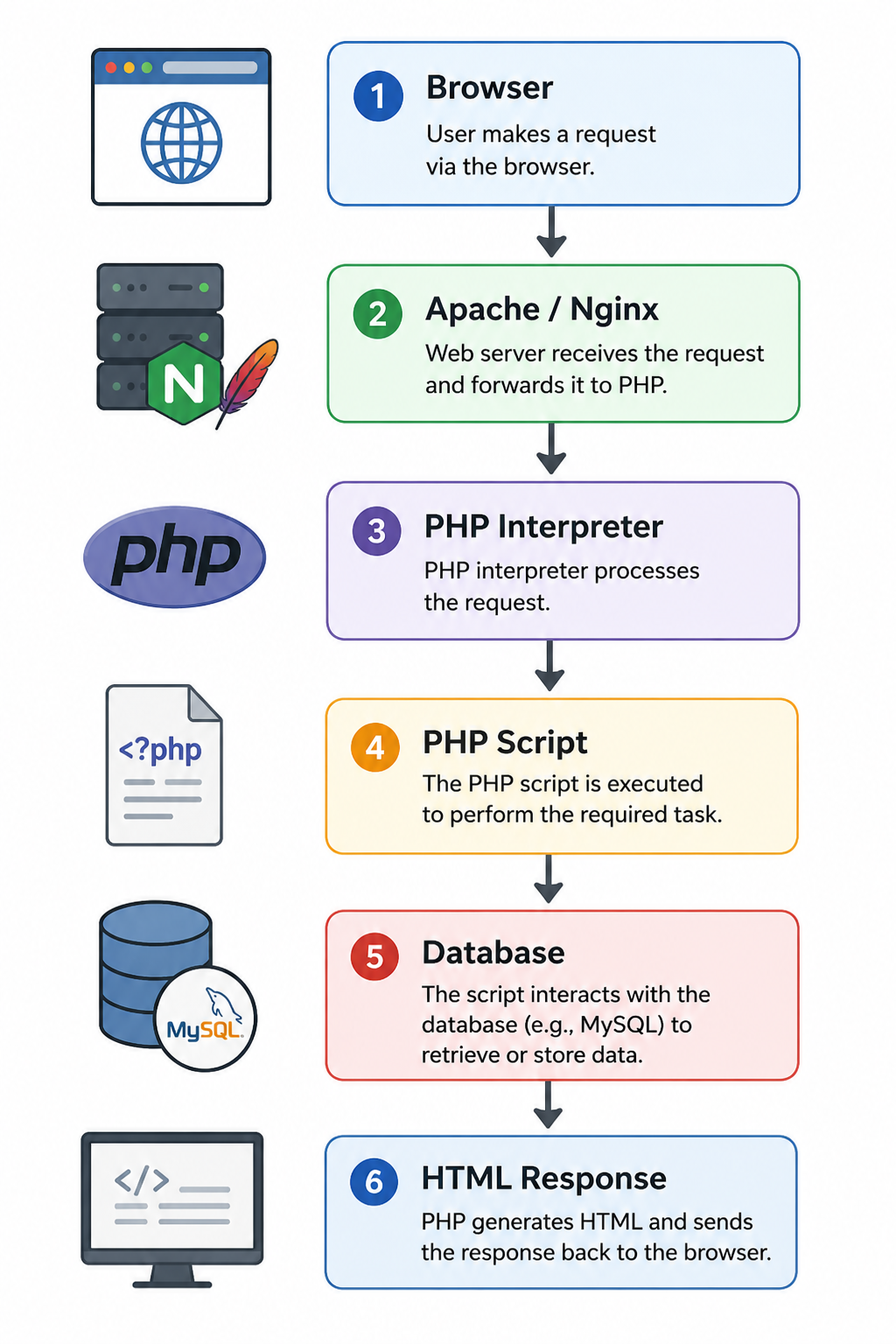
Unlike frameworks, there is no hidden routing engine.
Your PHP file directly handles the request.
Example:
index.php
products.php
contact.php
login.php
dashboard.php
Each file is an endpoint.
Basic Project Structure
A clean native PHP project may look like this:
Although PHP Native doesn’t enforce a structure, organizing your code improves maintainability.
Connecting to MySQL
Using PDO is the recommended approach.
<?php

$pdo = new PDO(
    "mysql:host=localhost;dbname=blog",
    "root",
    "password"
);
Now fetching users becomes easy.
$stmt = $pdo->query("SELECT * FROM users");

$users = $stmt->fetchAll(PDO::FETCH_ASSOC);
Always use prepared statements to prevent SQL injection.
Handling Forms
HTML
HTML

<form method="POST">
    <input name="name">
    <button>Submit</button>
</form>

PHP

<?php

if ($_SERVER['REQUEST_METHOD'] == 'POST') {

    $name = $_POST['name'];

    echo "Welcome " . htmlspecialchars($name);
}
Sessions in Native PHP
<?php

session_start();

$_SESSION['user'] = 15;

// Retrieves later

echo $_SESSION['user'];
Sessions are widely used for authentication.
File Upload Example
move_uploaded_file(
    $_FILES['photo']['tmp_name'],
    "uploads/" . $_FILES['photo']['name']
);
Always validate:
- File size
- File type
- MIME type
- Extension
Never trust user-uploaded files.
Authentication Example
A simple login flow looks like this:
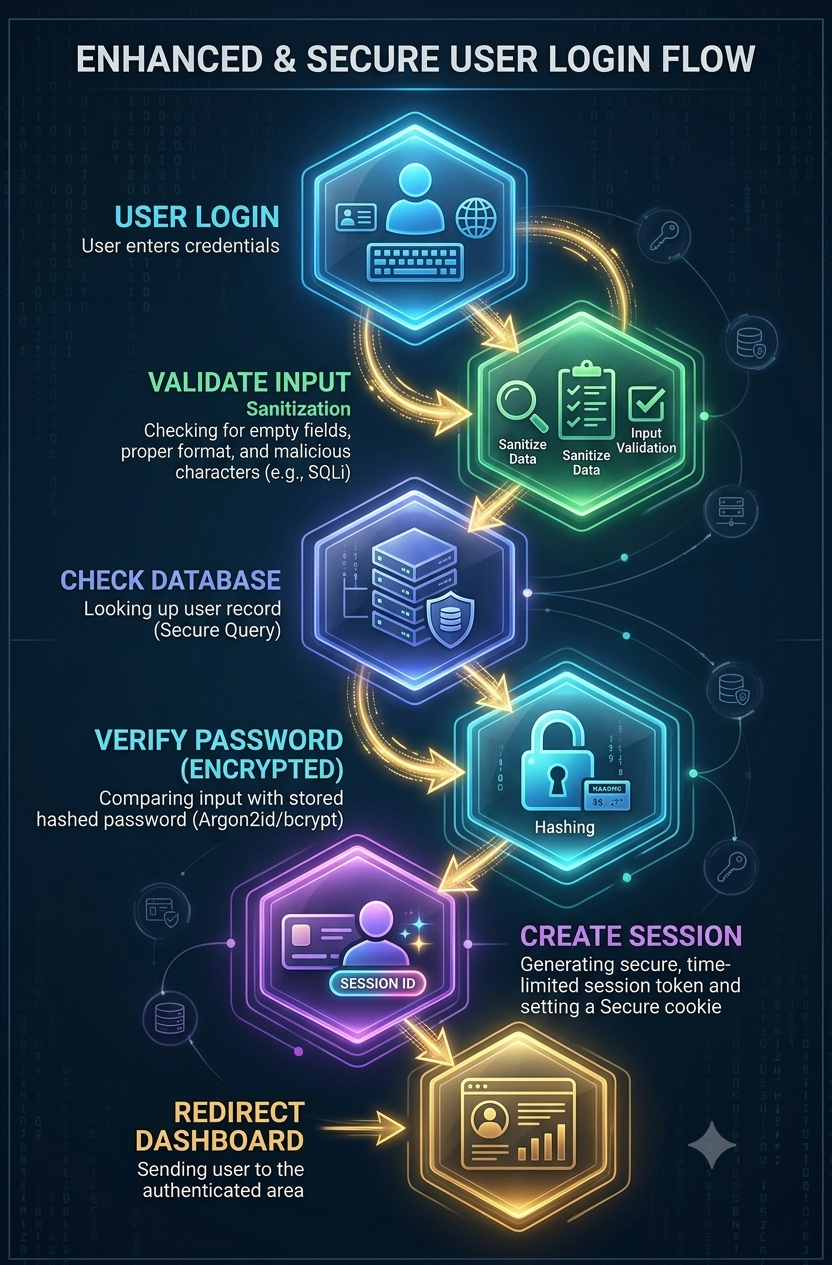
Password verification
if (password_verify($password, $user['password'])) {

    $_SESSION['user'] = $user['id'];

}
Never store plain-text passwords.
Use
password_hash()

password_verify()
Error Handling
Instead of displaying errors publicly,
ini_set('display_errors', 0);
Log them instead.
error_log($exception->getMessage());
Production websites should never expose PHP errors.
Security Best Practices
PHP Native requires developers to implement security manually.
Always follow these practices.
1. Use Prepared Statements
Wrong
$sql = "SELECT * FROM users WHERE id=".$_GET['id'];
Correct
$stmt = $pdo->prepare(
    "SELECT * FROM users WHERE id=?"
);

$stmt->execute([$id]);
2. Escape HTML
htmlspecialchars($name);
Prevents XSS attacks.
3. Validate Every Input
Never trust
- GET
- POST
- COOKIE
- FILE
Validate everything.
4. Hash Passwords
password_hash()
Never use
- md5
- sha1
5. Enable CSRF Protection
Generate CSRF tokens manually for forms.
6. Secure Sessions
Use
httponly
secure
sameSite
session cookies.
Advantages of PHP Native
Faster Learning
No framework complexity.
Lightweight
Applications load faster because there are fewer dependencies.
Complete Control
Developers control every line of code.
Better Understanding
You’ll understand routing, middleware, MVC, dependency injection, and service containers more deeply.
Lower Server Requirements
Native PHP applications consume fewer resources.
Disadvantages
PHP Native also has limitations.
- More repetitive code
- Manual routing
- Manual authentication
- Manual validation
- Harder maintenance
- Slower development for larger applications
- Team collaboration becomes difficult without standards
Native PHP vs Laravel
| Feature | PHP Native | Laravel |
|---|---|---|
| Learning Curve | Easy | Medium |
| Performance | Excellent | Very Good |
| Development Speed | Slower | Faster |
| Routing | Manual | Built-in |
| Authentication | Manual | Built-in |
| Validation | Manual | Built-in |
| Security | Manual | Built-in |
| ORM | Manual SQL | Eloquent |
| Maintenance | Developer-defined | Structured |
When Should You Use PHP Native?
Choose Native PHP if you are building:
- Small business websites
- Landing pages
- Internal company tools
- APIs with minimal dependencies
- Learning projects
- Educational applications
- Lightweight CMS
- Custom backend utilities
When Should You Use Laravel Instead?
Laravel is a better choice when building:
- SaaS platforms
- Enterprise software
- Large eCommerce applications
- Multi-tenant systems
- CRM software
- ERP solutions
- Large REST APIs
- Teams with multiple developers
Best Practices for Native PHP Development
Follow these recommendations for maintainable applications:
- Follow PSR coding standards.
- Use Composer for dependency management.
- Separate business logic from presentation.
- Keep configuration outside the web root.
- Use environment variables for secrets.
- Prefer PDO with prepared statements.
- Organize code using an MVC-like structure.
- Centralize error handling and logging.
- Validate and sanitize all user input.
- Write reusable helper functions instead of duplicating code.
Frequently Asked Questions (FAQs)
Q. Is PHP Native the same as Core PHP?
Ans. Yes. PHP Native and Core PHP refer to developing applications using the PHP language without a framework.
Q. Is learning PHP Native still worth it?
Ans. Absolutely. Understanding native PHP gives you a strong foundation for learning frameworks like Laravel and Symfony and makes you a more capable backend developer.
Q. Is Native PHP faster than Laravel?
Ans. In terms of raw execution, a well-written native PHP application can be slightly faster because it has less framework overhead. However, the performance difference is often negligible compared to the benefits frameworks provide for larger projects.
Q. Can I build an API using Native PHP?
Ans. Yes. You can create REST APIs using native PHP by handling HTTP requests, returning JSON responses, and managing routing manually.
Q. Is Native PHP secure?
Ans. Yes, provided you implement security best practices such as prepared statements, password hashing, CSRF protection, output escaping, secure session management, and rigorous input validation.
Conclusion
PHP Native is the foundation upon which every PHP framework is built. Mastering Core PHP helps you understand request handling, routing, database interactions, sessions, authentication, and security at a deeper level.
While modern frameworks like Laravel dramatically speed up development, knowing native PHP enables you to debug issues more effectively, write efficient code, and make informed architectural decisions. Whether you’re starting your backend journey or aiming to become a senior PHP developer, investing time in PHP Native is a skill that will continue to pay dividends throughout your career.
