
Artificial Intelligence has become an essential part of modern software development. From AI coding assistants and chatbots to content generation and automation platforms, developers are integrating Large Language Models (LLMs) into almost every application.
However, one challenge quickly appears when building AI-powered products:
Who should pay for the AI usage, and how should API keys be managed securely?
This is where BYOK (Bring Your Own Key) becomes a game-changing architecture.
Instead of the platform providing AI API access for every user, the platform allows each user to connect their own API key from providers like OpenAI, Anthropic, Google Gemini, or other AI vendors.
In this guide, we’ll explain everything developers and SaaS founders need to know about BYOK.
What Is BYOK?
BYOK (Bring Your Own Key) is a model where users provide their own API credentials to access third-party AI services instead of using the application’s shared API key.
Rather than this flow:
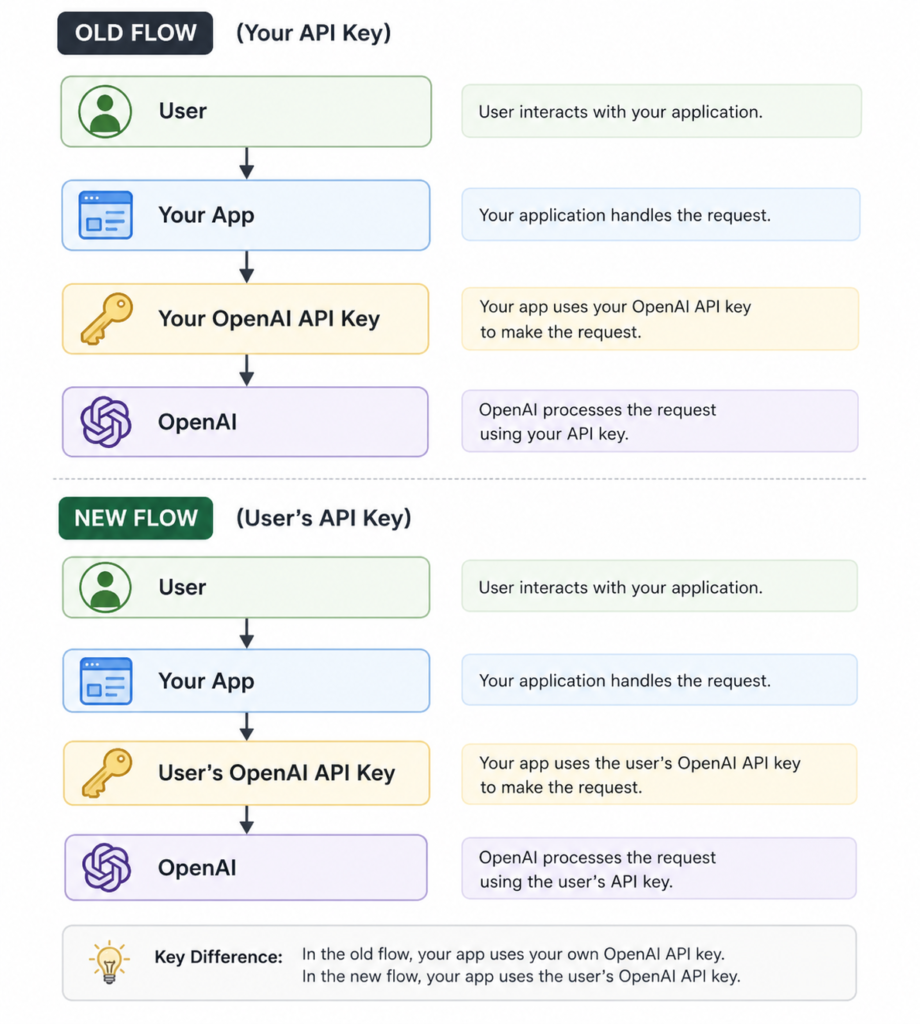
Your application becomes the interface while the AI provider bills the individual user directly.
Why BYOK Is Becoming Popular
Modern AI APIs charge based on usage.
If thousands of users consume AI through your application’s API key, your monthly costs can become unpredictable.
BYOK shifts usage costs from the application owner to the end user while giving users greater flexibility and control.
This model has become common among:
- AI coding assistants
- Prompt engineering tools
- AI writing platforms
- Workflow automation software
- AI browser extensions
- Internal enterprise AI tools
- SaaS productivity applications
How BYOK Works
The typical workflow looks like this:
Step 1: User Creates an API Key
The user signs up with an AI provider such as:
- OpenAI
- Anthropic
- Google Gemini
- Mistral
- Groq
- Together AI
They generate a personal API key.
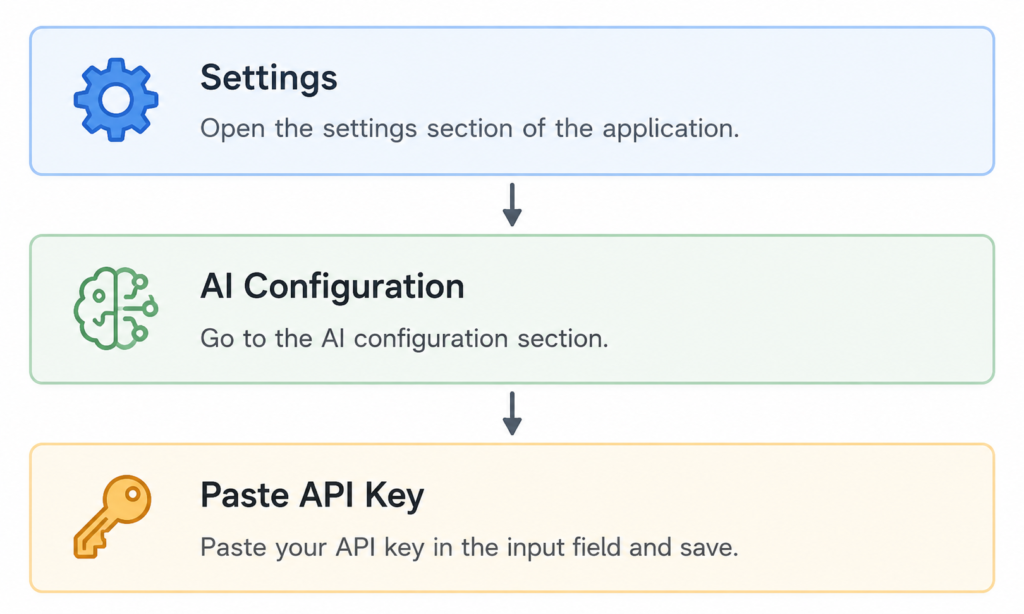
Step 2: User Adds the Key
Inside your application:
Step 3: Store Securely
Never save API keys in plain text.
Best practices include:
- Encryption at rest
- Secret management services
- Environment isolation
- Key rotation support
Step 4: AI Requests
Whenever the user performs an AI action:
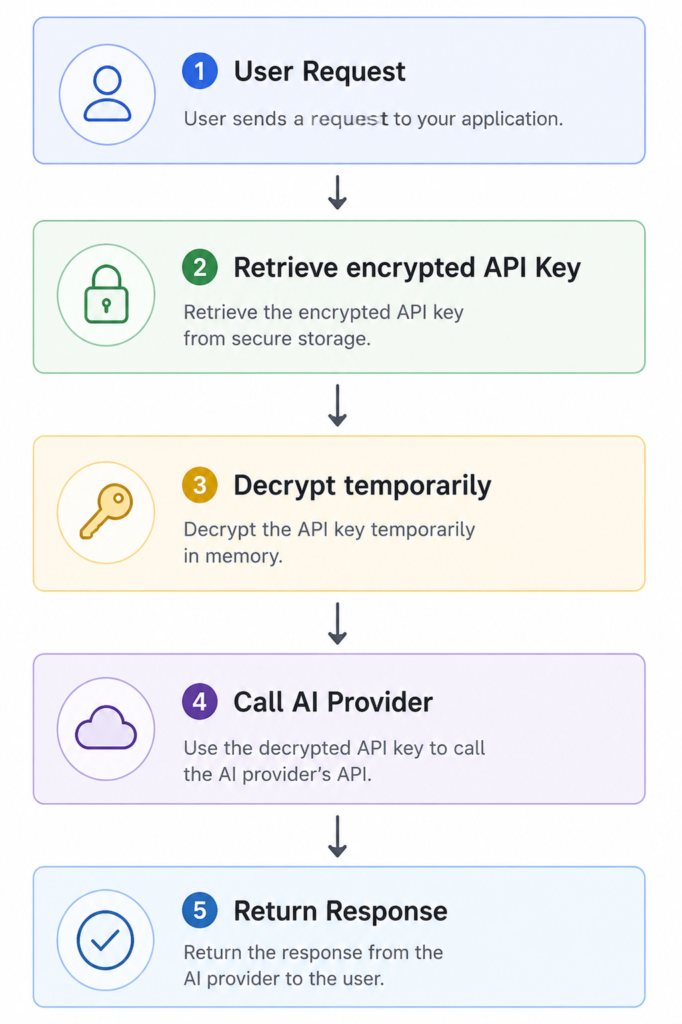
The platform never exposes the key to the frontend after storage.
Benefits of BYOK
1. Lower Infrastructure Costs
Without BYOK:
You pay for every AI request.
With BYOK:
Users pay directly to the AI provider.
This makes SaaS pricing much easier to manage.
2. Better Scalability
Suppose your application grows from:
- 100 users
- to 10,000 users
Without BYOK:
Your AI bill increases dramatically.
With BYOK:
Your infrastructure scales while AI costs remain largely independent of user activity.
3. User Control
Power users may already have subscriptions with AI providers.
They can:
- choose their preferred model
- manage spending
- monitor usage
- upgrade independently
4. Multi-Provider Support
Instead of locking users into one AI vendor, your platform can support several providers.
For example:
- OpenAI
- Anthropic
- Gemini
- Groq
- DeepSeek
- Mistral
Users simply select their preferred provider.
5. Improved Privacy
Many organizations prefer using their own AI accounts instead of routing requests through a vendor-managed key.
This provides:
- better auditability
- independent billing
- compliance with internal security policies
Typical BYOK Database Design
A simple schema might look like this:
users
| Column | Description |
|---|---|
| id | User ID |
| name | User name |
ai_providers
| Column | Description |
|---|---|
| id | Provider ID |
| provider | OpenAI, Gemini, Anthropic |
| active | Enabled or disabled |
ai_providers
| Column | Description |
|---|---|
| id | Provider ID |
| provider | OpenAI, Gemini, Anthropic |
| active | Enabled or disabled |
user_ai_keys
| Column | Description |
|---|---|
| id | Primary key |
| user_id | User reference |
| provider_id | AI provider |
| encrypted_key | Encrypted API key |
| status | Active or inactive |
| last_used_at | Last request time |
| created_at | Timestamp |
Never store plaintext keys in your database.
Security Best Practices
A secure BYOK implementation should include:
Encrypt API Keys
Use strong encryption before storing keys.
Mask Keys in the UI
Display:
sk-******************************
instead of the full value.
Validate Before Saving
When a user enters a key:
- Make a small API request.
- Verify the key works.
- Save it only if validation succeeds.
Support Multiple Keys
Many users maintain separate keys for:
- Development
- Production
- Team projects
- Personal work
Allow them to manage multiple credentials.
Usage Logging
Track:
- Request timestamps
- Selected provider
- Response status
- Token usage (when available)
- Error messages
This simplifies debugging and usage analytics.
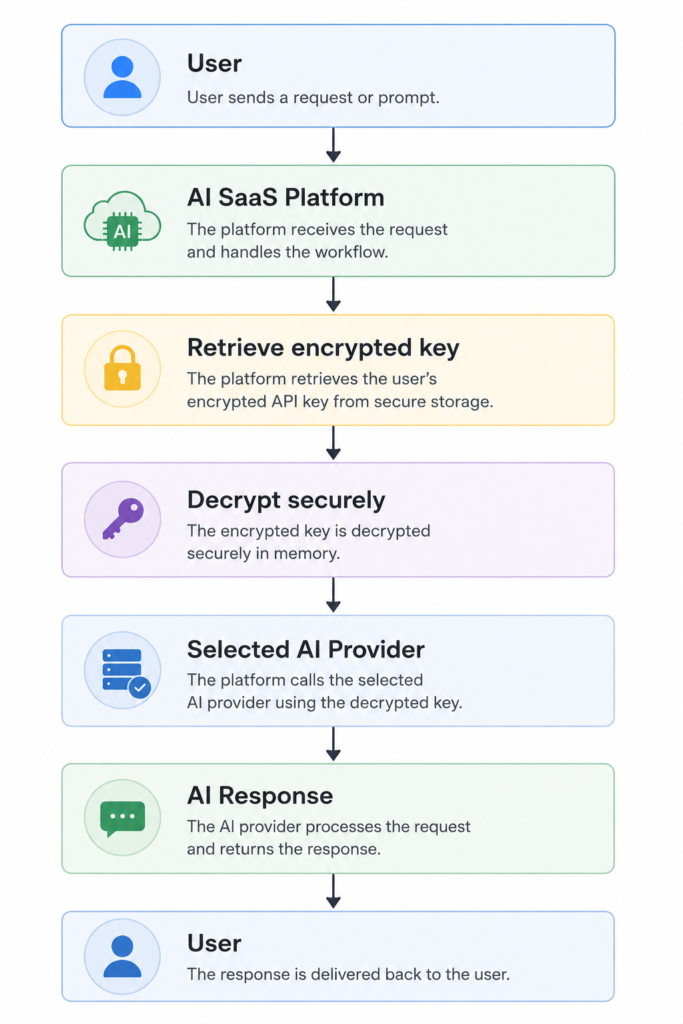
Example Architecture
Challenges of BYOK
Although powerful, BYOK introduces additional complexity.
Invalid API Keys
Users may paste:
- expired keys
- revoked keys
- malformed keys
Your application should validate and provide clear error messages.
Rate Limits
Each user’s API account has its own limits.
Handle:
- HTTP 429 responses
- retries with backoff
- user notifications
Provider Differences
Each AI provider offers:
- different models
- token limits
- pricing
- request formats
- streaming behavior
An abstraction layer in your application can normalize these differences.
Secure Key Rotation
Users should be able to:
- replace keys
- disable keys
- revoke keys
- remove unused credentials
without affecting the rest of their account.
When Should You Use BYOK?
BYOK is a strong fit if you’re building:
- AI coding assistants
- AI content generation tools
- Chatbot builders
- AI workflow automation
- Enterprise AI dashboards
- Developer utilities
- Browser extensions
- Internal productivity tools
It may be less suitable for consumer applications where a frictionless experience is more important than user-managed credentials.
BYOK vs Platform-Owned API Keys
| Feature | BYOK | Platform-Owned Keys |
|---|---|---|
| AI billing | User pays | Platform pays |
| Cost scalability | Excellent | Can become expensive |
| User flexibility | High | Limited |
| Multi-provider support | Easy | Depends on implementation |
| Enterprise adoption | Strong | Moderate |
| Setup complexity | Higher | Lower |
| Security responsibility | Shared | Platform-managed |
Best Practices Checklist
- Encrypt every stored API key.
- Never expose API keys to the frontend after saving.
- Validate keys before storing them.
- Allow users to switch between providers.
- Support key rotation and revocation.
- Log AI requests for troubleshooting.
- Respect provider rate limits.
- Design your code with a provider abstraction layer.
- Keep provider SDKs isolated behind service classes.
- Monitor API failures and alert users when their credentials need attention.
Final Thoughts
As AI becomes a core feature of modern applications, managing API credentials efficiently is just as important as selecting the right language model.
BYOK (Bring Your Own Key) offers a scalable and secure approach that benefits both SaaS providers and their users. It reduces operational costs, empowers users to choose their preferred AI provider, and simplifies billing by shifting API usage directly to the user’s account.
For developers, implementing BYOK correctly means focusing on secure key storage, flexible provider integrations, robust validation, and thoughtful user experience. When combined with encryption, proper logging, and an abstraction layer for multiple AI vendors, BYOK becomes a solid architectural choice for AI-powered products.
If you’re building the next generation of AI applications, adopting BYOK early can make your platform more scalable, enterprise-ready, and easier to maintain as the AI ecosystem continues to evolve.
